
ZeroFS serves S3-compatible buckets as POSIX filesystems over NFS and 9P, and as raw block devices over NBD. All three servers run in a single userspace process. Data is compressed and encrypted before upload.
ZeroFS differentiates itself from other "filesystem on S3" projects by:
- Being POSIX-conformant
- Reaching near-raw-S3 throughput on large files, and scaling to workloads of hundreds of millions of small files
- Handling tens of thousands of requests per second
- Requiring no external database service (everything is stored on S3)
- Being well tested (in CI we run pjdfstest, xfstests, kernel builds, stress-ng, ZFS, Jepsen local-fs, Jepsen HA, and more)
| File access | NFS and 9P servers. zerofs mount, the bundled FUSE client, is the recommended Linux mount. |
| Block access | NBD devices with TRIM. FLUSH and FUA replies return only after data is durable. |
| Encryption | Extents are encrypted with XChaCha20-Poly1305. Data key wrapped via Argon2id. |
| Compression | zstd or lz4, before encryption. Codec changeable at any time without migration. |
| Caching | Memory and disk tiers. |
| High availability | Optional leader/standby over the same bucket for automatic failover. |
| Web UI | File manager, dashboard, in-browser terminal. |
| Backends | Amazon S3, Google Cloud Storage, Azure Blob, any S3-compatible store, local disk. |
# Debian / Ubuntu
curl -fsSL https://pkgs.zerofs.net/zerofs.gpg | sudo gpg --dearmor -o /usr/share/keyrings/zerofs.gpg
echo "deb [signed-by=/usr/share/keyrings/zerofs.gpg] https://pkgs.zerofs.net/deb stable main" | sudo tee /etc/apt/sources.list.d/zerofs.list
sudo apt update && sudo apt install zerofs

# Fedora / RHEL / Rocky
curl -fsSL https://pkgs.zerofs.net/zerofs.repo | sudo tee /etc/yum.repos.d/zerofs.repo
sudo dnf install zerofs
Packages also install a systemd service (zerofs.service, disabled by default) and a config skeleton under /etc/zerofs/. Set ZEROFS_PASSWORD and credentials in /etc/zerofs/zerofs.env, the [storage] url in /etc/zerofs/config.toml, then sudo systemctl enable --now zerofs. Details: packaging/README.md.
curl -sSfL https://sh.zerofs.net | sh

# Pin a release and install without root
curl -sSfL https://sh.zerofs.net | VERSION=v1.2.5 INSTALL_DIR=$HOME/.local/bin sh
Downloads the release tarball, verifies the published SHA-256 checksum, and installs the prebuilt binary: Linux (amd64, arm64), macOS (x86_64, aarch64), FreeBSD (amd64). Full matrix: quickstart.
docker pull ghcr.io/barre/zerofs:latest

# Generate a starter config on the host ("-" writes to stdout)
docker run --rm ghcr.io/barre/zerofs:latest init - > zerofs.toml

$EDITOR zerofs.toml
docker run --rm -v "$PWD/zerofs.toml:/zerofs.toml" \
  ghcr.io/barre/zerofs:latest run -c /zerofs.toml
The container runs as UID 1001. A bind-mounted cache directory must be writable by UID 1001. To reach the servers from the host, bind addresses to 0.0.0.0 and map a port per enabled server: 2049 (NFS), 5564 (9P), 10809 (NBD).
zerofs init            # Generate zerofs.toml
$EDITOR zerofs.toml    # Set S3 credentials
zerofs run -c zerofs.toml- pjdfstest: 8,662 POSIX cases (pjdfstest_nfs), once per protocol: NFS, 9P, FUSE. Per-protocol exclude lists are in
.github/. - xfstests: the standard filesystem regression suite, over NFS, 9P, and FUSE.
- Kernel build: the Linux kernel compiles with
make -j$(nproc)on NFS, 9P, and FUSE mounts. - stress-ng: file-handling stressors run concurrently against live mounts.
- ZFS: a ZFS pool on ZeroFS block devices; kernel source extraction, then a scrub.
- Jepsen local-fs: random operation histories against a 9P mount, checked against a reference model (local-fs). A crash mode kills the server mid-run and verifies recovery matches the last fsync.
- Jepsen HA: a leader/standby pair over MinIO under a nemesis that kills or pauses nodes; no acknowledged write may be lost, resurrected, or corrupted across failover. The local-fs model checker also runs with failovers injected.
[servers.webui]
addresses = ["127.0.0.1:8080"]
uid = 1000  # POSIX identity for file operations from the browser; required
gid = 1000  # Required
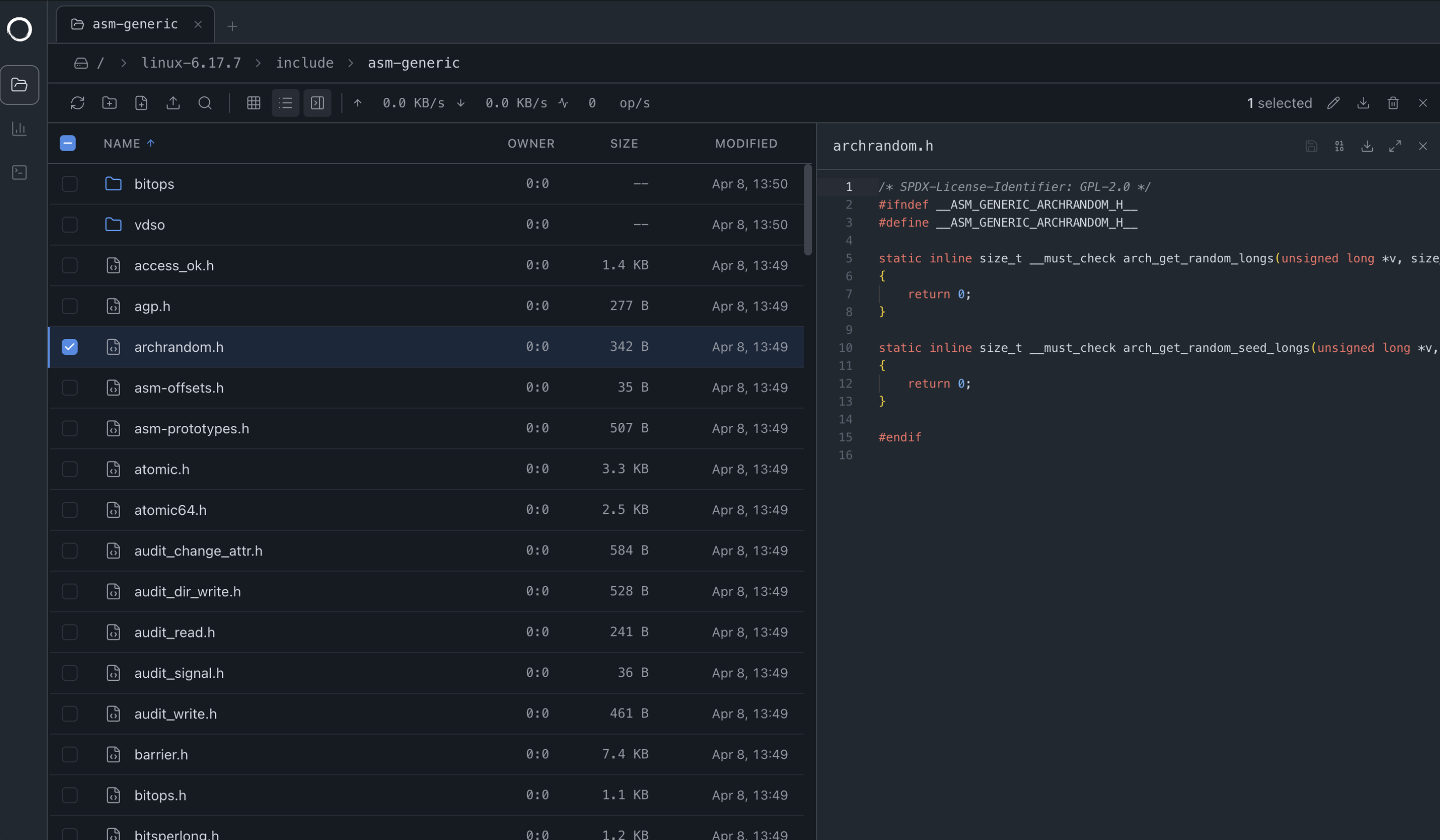
The file manager speaks 9P over WebSocket. Drag-and-drop uploads work, including entire folders.
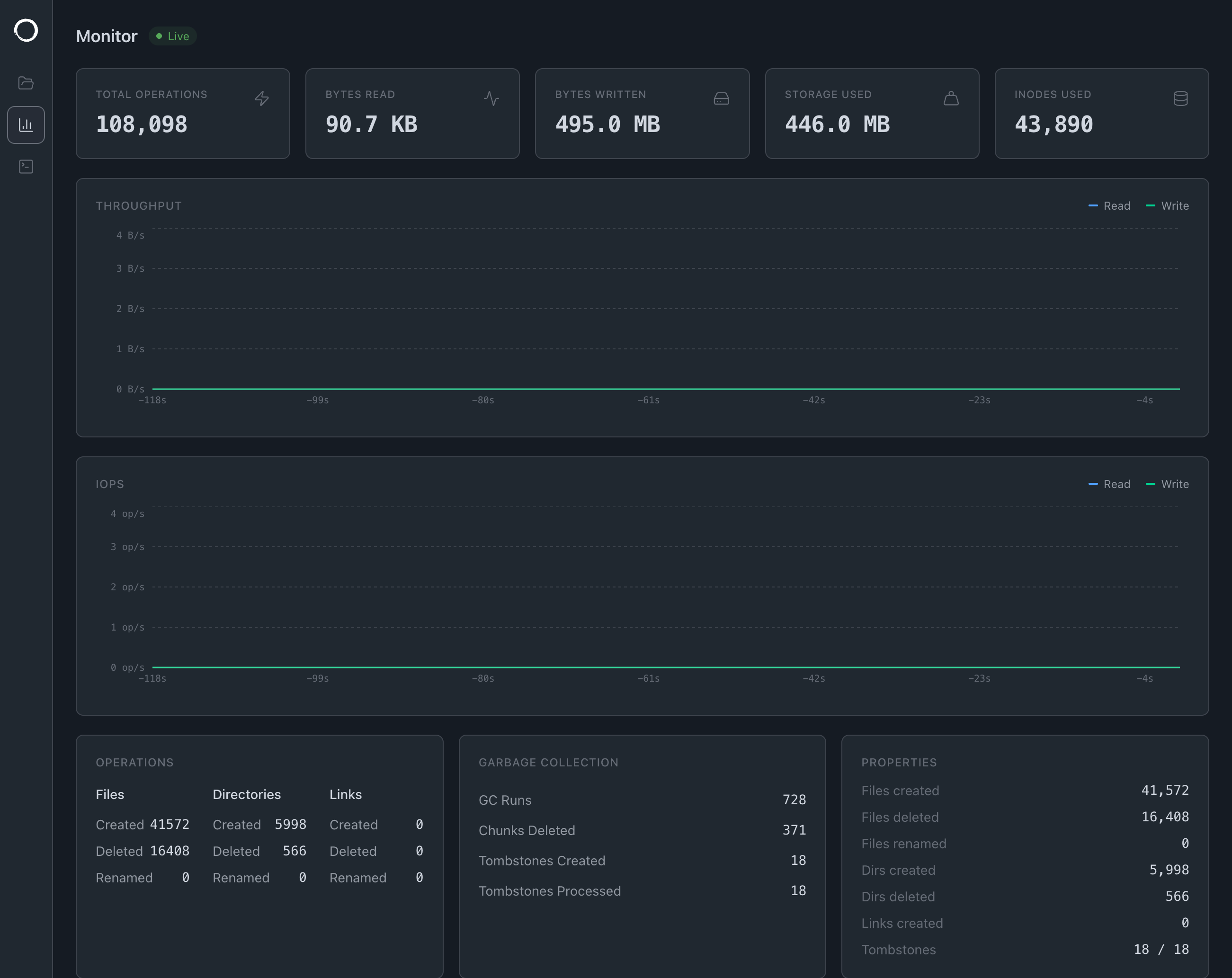
The dashboard streams stats over gRPC-web, plus a file access tracer.
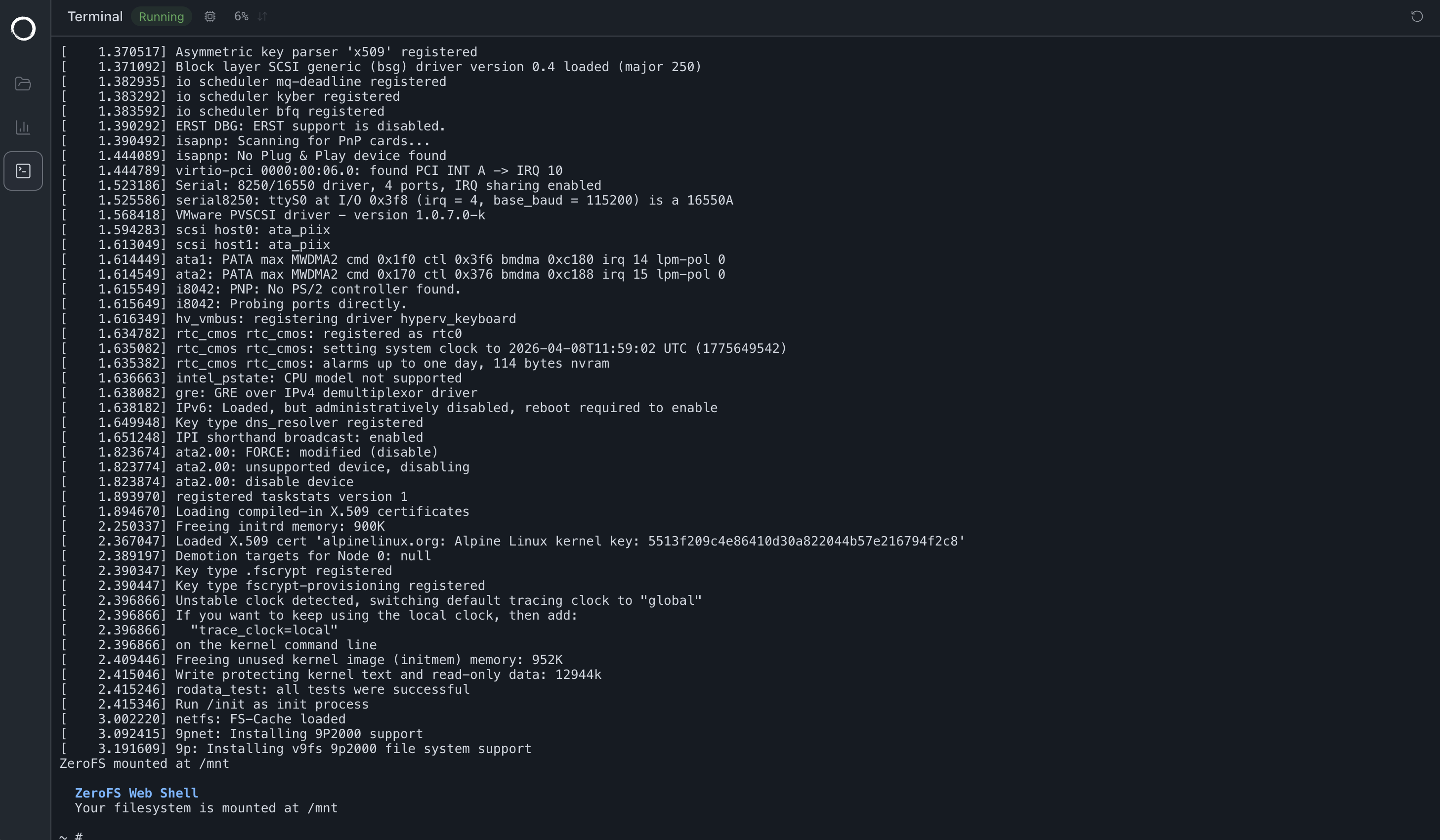
The terminal boots a Linux VM via v86, with the filesystem at /mnt over the same 9P WebSocket. The guest has no network device.
The NFS, 9P, and NBD servers and the Web UI share a single filesystem layer. File contents are split into 32 KiB extents; each extent is compressed, encrypted, and packed as a frame into immutable segment objects (up to 256 MiB). Metadata (inodes, directory entries, and one 32-byte pointer per extent) lives in an LSM-tree database on the same object store. architecture documentation.
graph TB
    subgraph "Client Layer"
        NFS[NFS Client]
        P9[9P Client]
        NBD[NBD Client]
        WEB[Web Browser]
    end

    subgraph "ZeroFS Core"
        NFSD[NFS Server]
        P9D[9P Server]
        NBDD[NBD Server]
        WEBUI[Web UI]
        VFS[Virtual Filesystem]
        SEG[Segment Store<br/>file data as compressed, encrypted frames]
        SLATE[LSM tree<br/>metadata + 32-byte extent pointers]
        CACHE[Local Cache]

        NFSD --> VFS
        P9D --> VFS
        NBDD --> VFS
        WEBUI --> VFS
        VFS --> SEG
        VFS --> SLATE
        SEG --> CACHE
        SLATE --> CACHE
    end

    subgraph "Storage Backend"
        SEGOBJ[Immutable segment objects<br/>segments/shard/epoch/counter]
        SSTS[Metadata SSTs + manifest]
        S3[S3 Object Store]

        CACHE --> SEGOBJ
        CACHE --> SSTS
        SEGOBJ --> S3
        SSTS --> S3
    end

    NFS --> NFSD
    P9 --> P9D
    NBD --> NBDD
    WEB --> WEBUI
A [replication] section runs a leader and a standby backed by the same bucket; there is no second copy of the data to provision. The standby semi-synchronously replicates acknowledged-but-unflushed writes and takes over in seconds if the leader fails. Writer-epoch fencing prevents split-brain: a deposed leader cannot commit. Design, guarantees, configuration: high availability.
TOML with $VAR/${VAR} environment substitution; all referenced variables must be set. [cache], [storage], and [servers] are required. Full option reference: Configuration Guide.
[cache]
dir = "${HOME}/.cache/zerofs"
disk_size_gb = 10.0
memory_size_gb = 1.0  # Optional, defaults to 0.25

[storage]
url = "s3://my-bucket/zerofs-data"
encryption_password = "${ZEROFS_PASSWORD}"

[filesystem]
max_size_gb = 100.0     # Optional; writes past the quota return ENOSPC (default 16 EiB)
compression = "zstd-3"  # Optional: "zstd-{1-22}" (default "zstd-3") or "lz4"

[servers.nfs]
addresses = ["127.0.0.1:2049"]

[servers.ninep]
addresses = ["127.0.0.1:5564"]
unix_socket = "/tmp/zerofs.9p.sock"  # Optional

[servers.nbd]
addresses = ["127.0.0.1:10809"]
unix_socket = "/tmp/zerofs.nbd.sock"  # Optional

[servers.rpc]
addresses = ["127.0.0.1:7000"]  # Needed by zerofs checkpoint, flush, monitor, fatrace, otrace

[aws]
access_key_id = "${AWS_ACCESS_KEY_ID}"
secret_access_key = "${AWS_SECRET_ACCESS_KEY}"
# endpoint = "https://s3.us-east-1.amazonaws.com"  # For S3-compatible services
# default_region = "us-east-1"
# allow_http = "true"  # For non-HTTPS endpoints (e.g., MinIO)
# conditional_put = "redis://localhost:6379" # For stores without conditional-put supporturl = "s3://bucket/path" # + [aws] credentials
url = "azure://container/path" # + [azure] storage_account_name / storage_account_key
url = "gs://bucket/path" # + [gcp] service_account, or ambient ADC on GCP VMs/GKE
url = "file:///path/to/storage" # Local disk; no credentialsFurther schemes (s3a://, abfs://, host-routed https://, memory://): Configuration Guide.
ZeroFS requires conditional writes (put-if-not-exists) for fencing. AWS S3 supports this natively; for stores that don't, set conditional_put to a Redis URL.
An optional storage_class under [storage] is passed verbatim to the backend (S3 x-amz-storage-class, GCS x-goog-storage-class, Azure x-ms-access-tier). Use a hot, standard-access class: archive tiers render the volume unusable, and infrequent-access tiers charge retrieval on ZeroFS's constant reads, usually costing more.
Over 9P, fsync returns only after data reaches stable storage; NFS COMMIT semantics let fsync return before that. If you depend on fsync durability, use a 9P-based mount.
zerofs mount 127.0.0.1:5564 /mnt/zerofs        # TCP
zerofs mount /tmp/zerofs.9p.sock /mnt/zerofs # Unix socketmount -t 9p -o trans=tcp,port=5564,version=9p2000.L,cache=mmap,access=user 127.0.0.1 /mnt/9p
# Unix socket
mount -t 9p -o trans=unix,version=9p2000.L,cache=mmap,access=user /tmp/zerofs.9p.sock /mnt/9pZeroFS reports NFS writes as stable while they are buffered; tested clients (macOS, Linux) do not send COMMIT on fsync. Use a 9P mount where fsync durability matters.
# macOS
mount -t nfs -o async,nolocks,rsize=1048576,wsize=1048576,tcp,port=2049,mountport=2049,hard 127.0.0.1:/ mnt
# Linux
mount -t nfs -o async,nolock,rsize=1048576,wsize=1048576,tcp,port=2049,mountport=2049,hard 127.0.0.1:/ /mnt
Mount options, persistent mounts, Windows: NFS access.
Device files in a .nbd directory attach as raw block devices:
# Create devices through any file mount
mkdir -p /mnt/zerofs/.nbd
truncate -s 1G /mnt/zerofs/.nbd/device1

# Connect (recommended: -persist, -timeout 600 for S3 latency, -connections 4)
nbd-client 127.0.0.1 10809 /dev/nbd0 -N device1 -persist -timeout 600 -connections 4
# Unix socket
nbd-client -unix /tmp/zerofs.nbd.sock /dev/nbd1 -N device1 -persist -timeout 600 -connections 4

mkfs.ext4 /dev/nbd0
# or
zpool create mypool /dev/nbd0
The handshake advertises FLUSH, FUA, and multi-connection support. FLUSH and FUA replies return only after data is durable, and a FLUSH on any connection covers all connections, so write barriers hold for ZFS pools and databases. Details: NBD devices.
New device files are picked up at runtime. Sizes are fixed at creation: to resize, disconnect, delete, and recreate. To remove a device, disconnect the client (nbd-client -d /dev/nbd0), then rm the file.
fstrim /mnt/block                    # Manual
mount -o discard /dev/nbd0 /mnt/block  # Automatic (filesystems)
zpool set autotrim=on mypool         # Automatic (ZFS)
TRIM deletes extent pointers and debits each segment's live-byte counter; a GC pass every 60 seconds deletes dead segments and repacks fragmented ones, reclaiming the space in S3.
- Maximum file size: 16 EiB
- Maximum filesystem size: 16 EiB
- Files over the filesystem lifespan: 2^64
- Hardlinks per file: 2^32
Format limits (64-bit inode and size fields, 32 KiB extents), not tested ones; provider limits and storage cost take effect first. See architecture.
Dual-licensed under the GNU AGPL v3 (fully featured, for open source use) and a commercial license.