


Keeping dependencies up-to-date is an important aspect of software maintenance. Update-time is a command line tool that scans your repository for dependencies and updates them to their latest versions. It pins unpinned versions if possible. To avoid adopting freshly published releases that may still be buggy, it applies a cooldown period. And it warns you about stale dependencies.
Its output highlights each dependency, so a run is easy to skim:
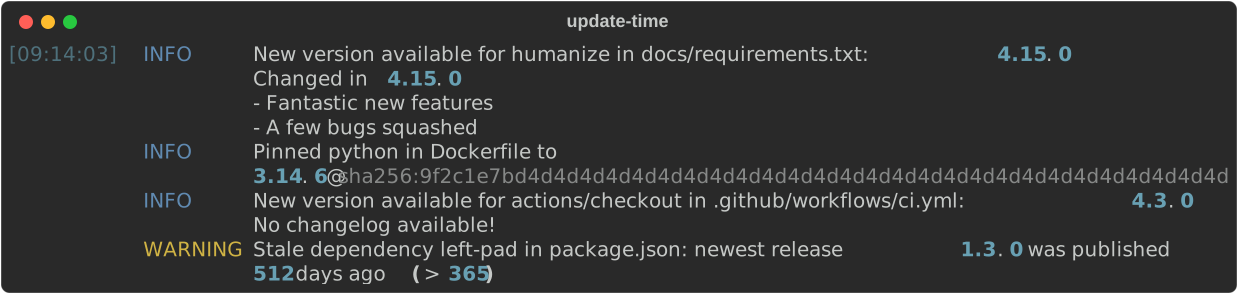
The same output as text
[09:14:03] INFO     New version available for humanize in docs/requirements.txt: 4.15.0
                    See the changelog for what changed
           INFO     Pinned python in Dockerfile to
                    3.14.6@sha256:9f2c1e7bd4d4d4d4d4d4d4d4d4d4d4d4d4d4d4d4d4d4d4d4d4d4d4d4d4d4d4d4
           INFO     New version available for actions/checkout in .github/workflows/ci.yml: 4.3.0
                    No changelog available!
           WARNING  Stale dependency left-pad in package.json: newest release 1.3.0 was published
512 days ago (> 365)Run Update-time without installing it using uvx:
uvx update-timeOr install it as a uv tool so it's always available on your PATH:
uv tool install update-time
update-time
Running update-time -h shows the full command-line interface:
$ update-time -h
usage: update-time [-h] [-V] [--cooldown DAYS] [--stale-after DAYS]
                   [--exclude-path PATHS] [--allow-image-digest-drift]
                   [--log-level {DEBUG,INFO,WARNING,ERROR}]
                   [PATH]

Scan the current repository for pinned dependencies and update them to their
latest versions, rewriting the pinned versions in place. Looks at
pyproject.toml, requirements.txt, package.json, Dockerfiles, GitHub Actions
workflows, CircleCI configs, GitLab CI configs, Docker Compose and Helm
manifests, devcontainer configs, and jsDelivr URLs. A cooldown period holds
back releases that are too fresh to trust.

positional arguments:
  PATH                  the directory to scan for dependencies to update;
                        paths in the log are reported relative to it (default:
                        the current directory)

options:
  -h, --help            show this help message and exit
  -V, --version         show program's version number and exit
  --cooldown DAYS       number of days to hold back newly published Docker
                        image, GitHub Action, requirements.txt, npm, pnpm,
                        pyproject.toml, and jsDelivr versions (default: 7)
  --stale-after DAYS    warn when a dependency's newest release is older than
                        this many days; 0 disables the check (default: 365)
  --exclude-path PATHS  comma-separated list of directories, relative to the
                        scan root, to exclude from the walk (e.g.
                        vendor,packages/legacy); every file under an excluded
                        directory is skipped, on top of the always-ignored
                        build, node_modules, __pycache__, and hidden folders
  --allow-image-digest-drift
                        when an already-pinned image tag has been re-pushed
                        under the same version, adopt its new digest instead
                        of only warning; equivalent to marking every image
                        reference with # update-time: allow[digest-drift] (an
                        # update-time: ignore marker still wins)
  --log-level {DEBUG,INFO,WARNING,ERROR}
                        the minimum severity of messages to log; available new
                        versions are logged at INFO (default: INFO)
Run with no options in the root of a repository and Update-time updates all its supported dependencies, scanning recursively.
To scan a different directory, pass a positional PATH — update-time ../other-project. If PATH does not exist or is not a directory, Update-time exits with status 2.
--exclude-path is useful when several repositories are checked out under a shared root, or for a vendored or generated subtree you don't want touched. The directories are matched by relative path, not by name: --exclude-path vendor excludes vendor/ at the root but not sub/vendor/. A listed directory that doesn't exist is not an error (it is logged at WARNING), but an absolute path, or one that escapes the scan root (../…), is rejected with exit status 2. Run with --log-level DEBUG to see each excluded directory logged.
Update-time exits with status 0 when it ran (whether or not it changed any files), 2 when the command-line arguments are invalid, and a non-zero status when some of the updates could not complete. The exit status does not indicate whether anything was updated — inspect the diff (or the INFO-level log) for that.
The recommended workflow is to run Update-time on a dedicated branch, push it, and let CI do the verification:
- Create a branch for the updates.
- Run
update-timein the root of your repository to update the dependencies in place. - Commit the changes and open a pull request.
- Let your tests and checks run in CI to confirm nothing is broken before merging.
To raise API rate limits while updating, set the following environment variables before running Update-time:
GITHUB_TOKEN— increases the GitHub API rate limit when updating GitHub Actions. The token only needs to read public release and commit data, so no specific scope is required: both a classic token with no scopes selected and a fine-grained token with default read-only access to public repositories work.DOCKER_HUB_USERNAMEandDOCKER_HUB_TOKEN— authenticate to the Docker Hub API (both must be set) to increase its rate limit when updating Docker images.
Update-time updates the following types of dependencies, found in the listed files, and using the listed sources:
| Dependency | Files | Source |
|---|---|---|
Python dependencies pinned with == |
pyproject.toml, hand-written requirements.txt, requirements-*.txt, *-requirements.txt, requirements/*.txt |
PyPI |
| npm and pnpm dependencies | package.json (and package-lock.json / pnpm-lock.yaml) |
npm registry |
| Node engine version | package.json |
the Node base image in the project's Dockerfile |
| Dockerfile base images (tag + digest) | Dockerfile, *.Dockerfile, Dockerfile.* |
OCI registries (Docker Hub, ghcr.io, mcr.microsoft.com, …) |
| CircleCI images (tag + digest) | CircleCI YAML configs | OCI registries (Docker Hub, ghcr.io, mcr.microsoft.com, …) |
| GitLab CI images (tag + digest) | .gitlab-ci.yml |
OCI registries (Docker Hub, ghcr.io, mcr.microsoft.com, …) |
| Docker Compose and Helm images (tag + digest) | Compose files and Helm folder | OCI registries (Docker Hub, ghcr.io, mcr.microsoft.com, …) |
| Devcontainer image and features (tag + digest) | .devcontainer/devcontainer.json, .devcontainer.json |
OCI registries (ghcr.io, mcr.microsoft.com, Docker Hub, …) |
| GitHub Action versions (SHA + tag) | workflow YAML files | GitHub releases API |
| jsDelivr npm URLs (version + SRI hash) | Sphinx config | npm registry |
Only versions specified with an exact match (== for Python, a concrete tag — optionally already pinned as tag@sha256:digest — for images) are updated; looser version specifiers are left untouched, so you can pin a maximum version to opt a dependency out of automatic updates. Where available, Update-time prints the changelog entries between the current and new version so you can review what changed.
Requirements files are discovered by name, case-sensitively: requirements.txt, requirements-<purpose>.txt (e.g. requirements-dev.txt), <purpose>-requirements.txt (e.g. dev-requirements.txt), and any .txt file in a requirements/ directory. Unrelated files such as constraints.txt or requirements.in are not touched. The following are left untouched:
- Git, VCS, and URL dependencies (e.g.
git+https://github.com/org/repo.git@v8.0.3.0, direct URLs, and-e/editable installs) — these are not registry versions, so Update-time does not bump their refs; update them manually. - Compiled or hash-pinned files — a
requirements.txtgenerated by pip-tools oruv pip compile(recognised by an autogenerated header, a sibling.infile, or--hash=lines) is skipped entirely, because bumping a single pin without recompiling its transitive dependencies and hashes would corrupt the file. Regenerate these with your compiler instead.
When updating an image tag, Update-time keeps the non-numeric parts of the tag and only advances its version numbers. A tag such as python:3.14.6-alpine3.23 has a label prefix (python), a main version (3.14.6), and a suffix (alpine3.23); the prefix and the suffix's label (alpine) are preserved, so a variant is never swapped out (python never becomes pypy, slim never becomes fat, alpine never becomes debian). Both the main version and a version embedded in the suffix are upgraded — independently or together, for example 3.14.6-alpine3.23 → 3.15.0-alpine3.24 — and neither axis is ever downgraded to adopt a newer value on the other. A suffix without an embedded version (bookworm-slim, windows) is treated as a fixed label, so it only ever matches itself.
References that are not yet pinned are pinned automatically:
- Docker images referenced by tag only — base images in Dockerfiles (
FROM image:tag), CircleCI images, GitLab CI images, Docker Compose / Helm manifest images, and devcontainer base images and features — get the@sha256:digestof the (latest) tag appended, so the image is reproducible. The image's registry is taken from the reference, so images on Docker Hub and on other OCI registries (ghcr.io,mcr.microsoft.com, …) are both resolved; the cooldown, however, only applies to Docker Hub, since the OCI protocol exposes no publication date. Images without a concrete version tag are ignored: references through a template ({{ ... }}) or variable substitution (${VAR}), and tagless base images such asFROM scratchor stage references. CircleCI machine-executor images (theimage:under amachine:key, such asubuntu-2204:2024.01.1) are also left alone, since they are not registry images. - GitHub Actions referenced by version tag only (e.g.
uses: actions/checkout@v4) are pinned to the commit SHA of the latest version, with the version added as a trailing comment (e.g.uses: actions/checkout@<sha> # v4.1.1). Actions referenced by a branch (e.g.@main) are left untouched because they don't resolve to a version.
When an image reference is already pinned to a digest and only that digest has changed at the registry — the tag was re-pushed (rebuilt) under the same name and version — Update-time warns about the digest drift but leaves the pin unchanged by default, so a re-pushed digest is never silently adopted (which would defeat the immutability a digest pin exists to provide). To adopt the new digest instead, opt the reference in with an # update-time: allow[digest-drift] marker (see Controlling updates per reference for placement), or pass --allow-image-digest-drift to opt every image reference in the scan in at once. Adopting drift is logged at INFO, like any other change. An # update-time: ignore (or ignore[update]) marker still wins over both, so a reference you deliberately froze is never re-pinned.
Comments of the form # update-time: <directive> let you steer what happens to an individual reference — most often to hold it back, but also to opt it into behaviour that is off by default. To stop Update-time from changing a specific reference — because of a known incompatibility, a deferred migration, or to keep something reproducible — add an # update-time: ignore comment (all lower-case). The reference is then left untouched and no registry or source is queried for it. You can add a reason after the marker, for example # update-time: ignore (pinned until the 3.13 migration).
By default the marker holds a reference back from both version updates and the staleness check. Add a bracketed scope to narrow it to just one:
| Marker | Version update | Staleness warning |
|---|---|---|
# update-time: ignore |
held back | held back |
# update-time: ignore[update] |
held back | still checked |
# update-time: ignore[stale] |
applied | held back |
So # update-time: ignore[update] keeps a deliberately pinned reference frozen while still telling you when the project behind it has gone quiet, and # update-time: ignore[stale] silences a staleness warning you've acknowledged without freezing the version. A reason can still follow the scope, for example # update-time: ignore[update] (pinned until the 3.13 migration).
One further marker does the opposite of holding a reference back. # update-time: allow[digest-drift] opts an already-digest-pinned image reference into adopting a re-pushed digest, so when only its digest has drifted the new digest is pinned instead of only warned about (see Pinning). It follows the same placement rules as the other markers, and the global --allow-image-digest-drift flag applies it to every image reference at once. Where an ignore (or ignore[update]) marker also applies, that wins and the reference is left untouched.
Any of these markers can be placed two ways:
-
Inline, on the reference's own line (in YAML files,
requirements.txt, and — with a//comment —devcontainer.json):image: python:3.12 # update-time: ignore
humanize==4.15.0 # update-time: ignore -
On the line directly above the reference. Use this form in Dockerfiles, which don't allow inline comments:
# update-time: ignore
FROM ghcr.io/astral-sh/uv:python3.12-bookworm-slim
This works for every reference Update-time rewrites line by line: Dockerfiles, Docker Compose and Helm manifests, CircleCI and GitLab CI configs, GitHub Actions workflows, devcontainer.json files, and requirements.txt files. Use a # comment everywhere except devcontainer.json (which is JSONC), where the marker goes in a // comment. An inline marker pins only its own line, so it never accidentally pins the reference on the line below it.
Run with --log-level DEBUG to see each held-back update logged and confirm a marker is recognised. Since the marker is case-sensitive, a typo (or wrong case) simply produces no such log and the reference is updated as usual.
For pyproject.toml and package.json — which are updated through uv, npm, and pnpm rather than line by line — the marker does not apply. Opt a dependency out there by pinning it with a maximum or non-== version specifier instead (for example package<=3.12). The marker likewise has no effect on jsDelivr URLs, which are rewritten through a whole-file substitution rather than the line-by-line engine; there is currently no way to exclude a specific jsDelivr URL from updates.
To avoid adopting releases that are too fresh to trust, Update-time honours a cooldown period during which newly published versions are not yet picked up. It defaults to 7 days and can be changed with the --cooldown option, for example update-time --cooldown 14. How the cooldown is applied depends on the dependency type:
- Docker images, GitHub Actions,
requirements.txtdependencies, and jsDelivr npm URLs — Update-time enforces the cooldown itself, based on each image tag's push date and each release's publication date. - npm dependencies — Update-time passes the cooldown to
npmvia npm'smin-release-ageoption (also measured in days), which npm added in 11.10.0; older npm versions ignore the option, so updates still run but without a cooldown. If your project already configures a cooldown in its.npmrc(min-release-ageorbefore), Update-time leaves that in place instead of overriding it. - pnpm dependencies — Update-time passes the cooldown to
pnpmvia pnpm'sminimumReleaseAgesetting, converting the value to minutes (pnpm measures the age in minutes rather than days). If your project already configuresminimumReleaseAge(inpnpm-workspace.yaml), Update-time leaves that in place instead of overriding it. pyproject.tomldependencies — Update-time applies the cooldown through uv'sexclude-newersetting, which it writes into yourpyproject.tomlunder[tool.uv](as a relative value such asexclude-newer = "7 days", tagged with amanaged by Update-timecomment). It writes this to the workspace root, so a plainuv sync --lockedkeeps working afterwards without having to repeat the setting on the command line. Because the value lives in[tool.uv], the cooldown then applies to every uv command in the project (uv lock,uv add, CI), not just to Update-time. Update-time keeps its own (commented) value in step with--cooldown, but never touches a value you set yourself: if yourpyproject.tomlalready setsexclude-newer(without the marker comment), or theUV_EXCLUDE_NEWERenvironment variable is set, Update-time leaves that in place instead. Remove the marker comment to take ownership of the line and stop Update-time from changing it.
Keeping a pin on the latest version doesn't help if that latest version is itself years old: the project may have been abandoned or superseded. Alongside updating, Update-time warns when a dependency's newest release is older than a threshold, so you can decide whether to keep it, replace it, or vendor it. The threshold defaults to 365 days and is set with --stale-after DAYS; pass --stale-after 0 to disable the check entirely. The warning is informational only — it never changes a file and never affects the exit status — and is logged at level WARNING. For example, a pin whose newest release came out well over a year ago is reported as:
WARNING requirements.txt: Stale dependency humanize in docs/requirements.txt: newest release 4.15.0 was published 512 days ago (> 365)The date compared against the threshold is the publication date of the dependency's newest release so that a project that has just published a release (even one still within the cooldown window) is never reported as stale. A reference held back with a bare # update-time: ignore (or # update-time: ignore[stale]) marker is not checked for staleness either; # update-time: ignore[update] holds back only the update, so its staleness is still reported (see Controlling updates per reference).
Every kind of dependency Update-time updates is checked for staleness, except the Node engine version in package.json: it is derived from the project's Dockerfile rather than a registry release, so it has no publication date to compare (the Node base image it comes from is itself checked, in the Dockerfile). Two data limitations narrow the check where the date isn't available: package.json dependencies given as git, file, workspace, or alias references are skipped, since they don't resolve to a registry release; and image tags are only checked on Docker Hub, because the push date the check relies on isn't exposed by other registries (ghcr.io, mcr.microsoft.com, …) — the same limitation as the cooldown. Because a maintained image tag is rebuilt (re-pushed) periodically, its push date reflects that maintenance, so a still-maintained tag is not reported as stale even when its version is old.
Point of contact for this repository is Frank Niessink.