


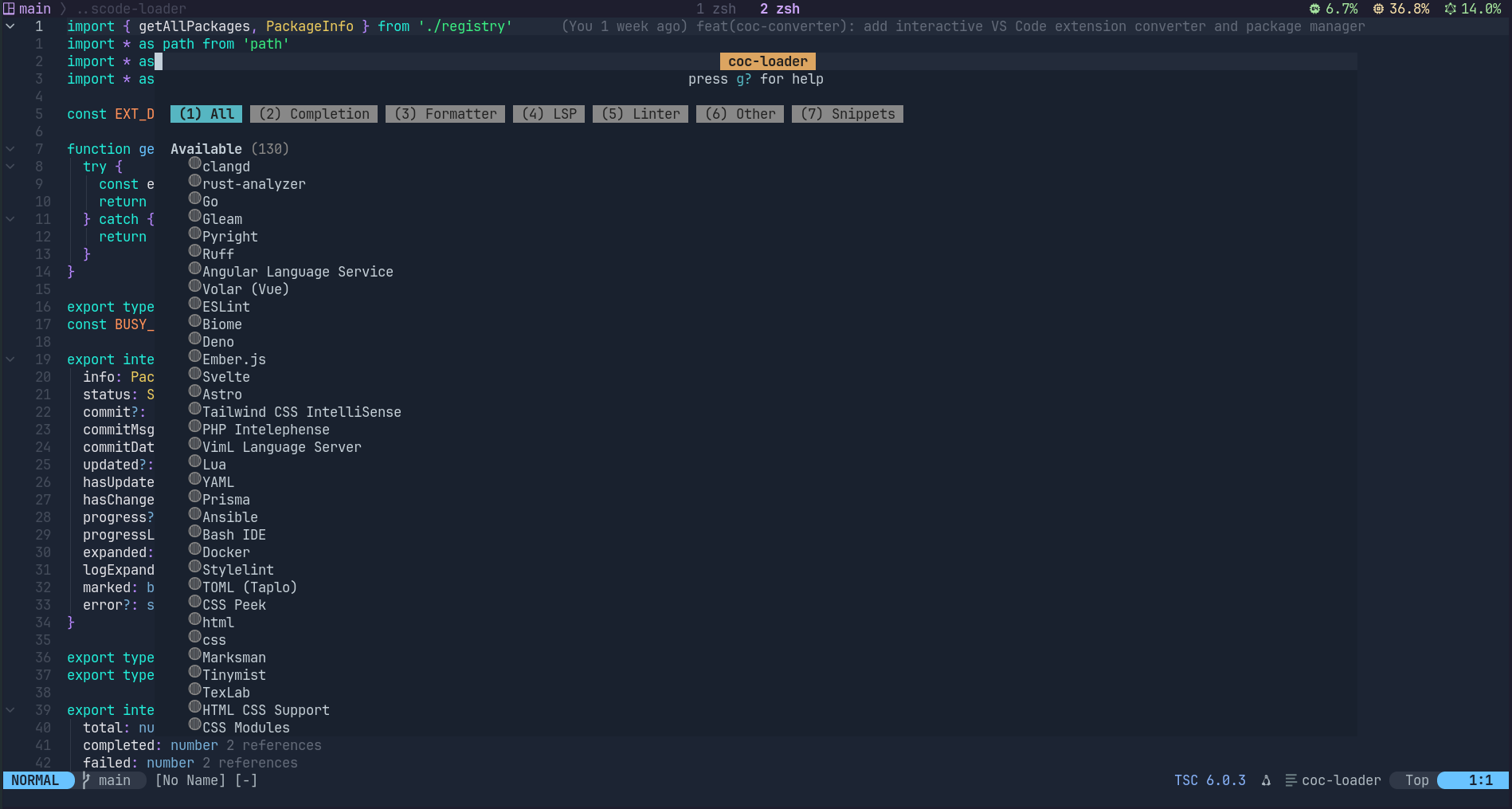

Convert VS Code extensions into coc.nvim plugins at install time and run them natively. Supports Neovim 0.8+ and Vim 9.0+.

⚠️ IMPORTANT: Keep coc-vscode-loader Updatedcoc-vscode-loader is under active development. Each release includes critical bug fixes, converter improvements, and registry updates. Always use the latest version — running an outdated version will silently produce broken plugin conversions (e.g., formatters that don't format, wrong notification colors, or language servers that fail to start).
When updating, the loader automatically detects which installed plugins changed — affected plugins are marked
[changed]in the TUI. Only those need reinstalling, not everything.:CocUpdate coc-vscode-loader " Update to latest :CocCommand loader.open " Check for [changed] markers, press R on those " Or reinstall a specific plugin: :CocCommand loader.reinstall <name>Failure to keep the loader + all plugins in sync is the #1 source of reported issues.
Every registry entry points to an upstream VS Code extension that evolves independently. The Registry Update Check workflow runs daily to ensure nothing silently breaks:
flowchart LR
  A[00:00 / 12:00 Beijing] --> B[Check 134 repos]
  B --> C{Upstream changed?}
  C -->|No| D[Skip]
  C -->|Yes| E[Run converter]
  E --> F{Output changed?}
  F -->|No| G[Skip]
  F -->|Yes| H[Create PR]
  F -->|Error| I[Create Issue]
| What happens | Action |
|---|---|
| Upstream has new commits → output matches baseline | ✅ Skipped (no news is good news) |
| Upstream has new commits → output changed | 📬 PR created — review & merge |
| Upstream repo is deleted / archived | 📬 Issue created — investigate |
| Converter fails on new upstream code | 📬 Issue created — debug needed |
Each outdated entry gets one isolated PR with detailed diff output and upstream commit history. No noise — only actionable results. See docs/registry-update-checker.md for full design.
Trigger manually: gh workflow run registry-check.yml or via the Actions tab.
Install the loader plugin:
:CocInstall coc-vscode-loaderThen open the TUI to browse and install available extensions:
:CocCommand loader.openWhat happens when you install a plugin (AOT — Ahead-of-Time):
git clonethe upstream VS Code extension source- Run the converter (ts-morph AST transforms + text replacements) to produce a complete coc.nvim plugin package
npm install+esbuildto bundle the output- Copy the result to
~/.config/coc/extensions/node_modules/coc-<name>and register it
No runtime interception or JIT overhead — coc.nvim loads a normal plugin at startup.
Or auto-install extensions via vim variable (no TUI needed):
" .vimrc
let g:coc_loader_global_extensions = ['vscode-pyright', 'vscode-eslint']
-- init.lua
vim.g.coc_loader_global_extensions = { 'vscode-pyright', 'vscode-eslint' }Browse all available extensions online: coc-plugin.github.io/coc-vscode-registry
Use the one-step conversion script:
bash scripts/convert-plugin.sh <name> <github-repo> [subdir]
# Examples:
bash scripts/convert-plugin.sh eslint microsoft/vscode-eslint
bash scripts/convert-plugin.sh volar vuejs/language-tools extensions/vscode
For manual conversion:
cd converter
echo '[{"type":"source","transforms":["import-mapping"],"entry":"src/extension.ts"}]' > convert.json
npx tsx src/cli.ts convert ../path/to/vscode-ext -o ./output --convert-file convert.json
cd ./output && npm install && node esbuild.mjs
📖 See
docs/for full API mapping docs and converter design.
coc.nvim's API is heavily influenced by the VS Code extension API — both use the same LSP protocol, similar provider systems, and comparable namespace structures. This makes it possible to mechanically convert VS Code extensions to run as coc.nvim plugins.
This repo contains two parts:
- Converter CLI (
converter/) — automatically converts VS Code extensions to coc plugins - Loader plugin (
plugin/) — coc.nvim plugin with a TUI to install/update/uninstall converted plugins
Input (VS Code extension source)
  → 1. git clone upstream repo
  → 2. Scanner — detect files using VS Code API
  → 3. Steps pipeline (5 registered generators):
  │     ├─ language-client  → LanguageClient code (module/binary server)
  │     ├─ source           → Copy + 5 AST transforms (import-mapping, class-to-factory,
  │     │                    provider-register, enum-offset, strip-volar)
  │     ├─ bridge           → Bridge code from BRIDGE_TEMPLATES (tsserver-forward)
  │     ├─ snippets         → Copy snippets JSON + stub entry
  │     └─ mark-unsupported → Remove unsupported API calls
  → 4. Text replacements (.fileName, .uri.fsPath, getWordRangeAtPosition, WorkspaceEdit)
  → 5. Plugin patches (per-entry find/replace from registry)
  → 6. Generate package.json + esbuild.mjs + server-patches.json
  → 7. npm install + esbuild → lib/index.js
  → Output: coc plugin package at ~/.config/coc/extensions/node_modules/coc-<name>
Three test suites, each catching different issues:
npm test                    # Unit tests (167) + fixture tests + test coverage check
npm run test:full           # Unit tests + registry baseline diff
npm run test:smoke # Registry smoke test (all 134 entries — validates output structure)| Suite | What it catches | CI |
|---|---|---|
npm test |
Transform/fixture correctness (fast, ~1s) | ✅ |
npm run test:full |
Unintended side effects on all 134 registry entries | ❌ (manual) |
npm run test:smoke |
Registry entry conversion completeness | ✅ |
Baseline diff (npm run diff:baseline / npm run diff:check):
Before changing converter code, snapshot current output; after changes, compare to detect which plugins are affected. See AGENTS.md for full workflow.
Pre-push hook — git push automatically runs npm test + npm run test:smoke. Configure once:
git config core.hooksPath .githooks
# Or just run npm install (pre-configured via postinstall)
Skip with git push --no-verify (use sparingly).
GitHub Actions CI — three sequential jobs:
unit(Node 20/22): unit tests + fixture testsdiff: registry baseline check (detects unintended converter side effects)smoke: full registry conversion (validates output structure)
# Check current mode
bash switch.sh status

# Use local development version
bash switch.sh local

# Use npm published version
bash switch.sh npm
Or via npm scripts:
npm run switch:status
npm run switch:local
npm run switch:npm
Note for npm 11+:
switch.sh npmtemporarily removesfile:dependencies fromextensions/package.jsonto avoid reify errors, then restores them automatically.
After switching, run :CocRestart in Neovim.
npm run build          # build everything
cd plugin && npm run build # build plugin only- Linux ✅ Fully supported
- macOS ✅ Fully supported
- Windows ❌ Not supported (compatibility plans in
docs/windows-compatibility.md, but pipeline currently requires Unix shell commands)
| Editor | TUI | Notes |
|---|---|---|
| Neovim 0.8+ | ✅ Full floating window + extmark | Recommended, full Mason-style experience |
| Vim 9.0+ | ✅ Split window + prop_add | Bottom split, no backdrop, no live search |
These must be installed and available on PATH:
| Command | Required by | Notes |
|---|---|---|
git |
Source download & update checks | |
node / npm / npx |
Plugin build, converter runtime | Node.js >= 18 |
curl |
Registry fetch fallback, binary server download | |
unzip |
Binary server extraction | |
tar / gunzip |
Binary server extraction | |
python3 |
Pip package installation (e.g. ansible-lint) | Only if plugin requires pip packages |
pip (via python3 -m pip) |
Python dependency installation | Only if plugin requires pip packages |
All commands are pre-installed on typical macOS/Linux development machines or available via the system package manager (apt, brew, etc.).
Close the TUI — it will auto-run :CocRestart. Or manually run :CocRestart.
Browse the registry website or check registry.json. Includes LSP servers, direct-API plugins, and snippet extensions for most languages.
The converter rewrites VS Code API calls to coc.nvim equivalents. You get the same functionality without needing VS Code.
Yes! See CONTRIBUTING.md for the full workflow. In short:
- Add an entry to the registry repo
- Run
npm test+npm run test:smoketo verify - Submit a PR
- 💬 Discussions
- 🐛 Issues
- 📖 API mapping docs · Converter design · Registry website
- ⭐ Star the repo if you find it useful!