A modern, cross-platform SIP phone application available for Web, Desktop, and Mobile platforms. Built with WebRTC technology for crystal-clear voice communications.


- Features
- Quick Start
- Requirements
- User Accounts
- Configuration
- Development
- Screenshots
- Troubleshooting
- Support
- License
- WebRTC/SIP Integration - Full SIP over WebSocket support using SIP.js
- Outgoing Calls - Dial any number with automatic number sanitization
- Incoming Calls - Visual call notifications with caller ID display
- Call Controls - Mute, hang up, call duration timer
- DTMF Support - Send touch-tone digits during calls via dialpad or keyboard
- Ringing Handling - Local ringback on 180/183; early media muted until answer
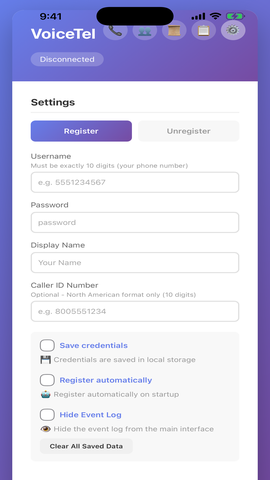
- Local Storage - Credentials stored locally using browser storage
- Hide Caller ID - Optional privacy mode for outgoing calls
- No External Dependencies - All data processing happens locally
- Secure SIP over TLS - Encrypted signaling
Web Browser
- 🌐 Instant launch links (tel: / custom scheme)
- 🚀 No installation required — perfect for kiosks & VDI
- 📱 Browser mic permissions guide
- 📋 Real-time SIP message logging and debugging
Desktop (Windows, macOS, Linux)
- 🖥️ System tray & global mute hotkey
- 🔄 Auto-start on login, auto-register
- 💪 Crash-resilient reconnect & logs
- 🎙️ Call recording with inline playback and mixed audio tracks
- 📞 Call history with audio playback and redial functionality
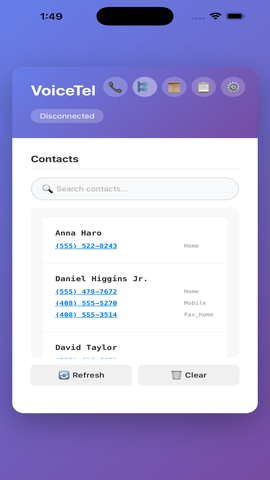
- 👥 Google Contacts integration with search and quick dial
- 📋 Event Log - Real-time SIP message logging and debugging
- 🔔 Desktop notifications for incoming calls
- ⌨️ Keyboard shortcuts (Enter to answer, Escape to decline)
Mobile (iOS, Android)
- 🎧 Native audio routing & Bluetooth
- 📱 Background mode with quick actions
- 🎙️ Call recording with inline playback and mixed audio tracks
- 👥 Device contacts integration (permission required)
- 🕘 Call history with integrated recording playback
- 📋 Real-time SIP message log
- Caller ID Customization - Set custom display name and 10-digit North American caller ID
- Smart Number Handling - Accepts any format, automatically cleans to digits
- Auto-Rejection - Busy signal for incoming calls when already on a call
- 30-Second Timeout - Auto-decline unanswered incoming calls
- Automatic DTMF - RFC 2833 telephone-event with SIP INFO fallback
- WebRTC Diagnostics - Built-in troubleshooting tips for media negotiation issues
- NAT-friendly ICE/STUN configuration - Works behind firewalls and NAT
Simply visit the VoiceTel Phone Web App and start calling immediately.
- Download the installer from Windows Guide
- Run the
.exeor.msiinstaller - Launch from Start Menu
- Download from macOS Guide
- Open the
.dmgand drag to Applications - Launch from Applications folder
- Download from Linux Guide
- Choose your preferred package:
- AppImage: Portable, works across most distros
- Debian/Ubuntu:
.debpackage for APT integration - Fedora/Red Hat:
.rpmpackage for DNF/yum integration
- Follow the iPhone Setup Guide
- Enable Developer Mode in iOS Settings
- Install via Xcode (Mac required)
- Follow the Android Setup Guide
- Enable Developer Options
- Install via Android Studio
- Modern browser with WebRTC support (Chrome, Firefox, Safari, Edge)
- Microphone permissions
- Stable internet connection
- Windows: Windows 10 or later
- macOS: macOS 10.15 or later
- Linux: Most modern distributions
- iOS: iOS 14 or later (Developer Mode required)
- Android: Android 8.0 or later (Developer Options required)
Before using VoiceTel Phone, you'll need to create an account:
- Account Management: www.voicetel.com
- Registration: Sign up for a VoiceTel account
- Account Setup: Configure your SIP credentials and preferences
You'll need the following information from your administrator:
- Domain: Your SIP domain (e.g.,
tls.voicetel.com) - Username: Your 10-digit phone number
- Password: Your SIP password
- Display Name: Your preferred display name
- Caller ID: Optional 10-digit North American phone number
Desktop Applications:
- Windows:
%APPDATA%/VoiceTelPhone/voicetel.json - macOS:
~/Library/Application Support/VoiceTelPhone/voicetel.json - Linux:
~/.config/VoiceTelPhone/voicetel.json
System-wide (Desktop):
- macOS:
/Library/Application Support/VoiceTelPhone/voicetel.json - Linux:
/etc/VoiceTelPhone/voicetel.json
phone/
├── index.html          # Landing page
├── phone.html          # Web application
├── knowledge.html      # Installation guides
├── windows.html        # Windows-specific guide
├── macOS.html          # macOS-specific guide
├── linux.html          # Linux-specific guide
└── README.md           # This file
The web application is a single HTML file with embedded CSS and JavaScript. No build process required.
Desktop applications are built using platform-specific tools:
- Repository: voicetel/voicetel-phone-desktop
- Windows: Visual Studio / MSBuild
- macOS: Xcode
- Linux: CMake / Make
Mobile applications require platform-specific development environments:
- Repository: voicetel/voicetel-phone-mobile
- iOS: Xcode (macOS required)
- Android: Android Studio
Audio not working:
- Check microphone permissions in system settings
- Verify correct input/output device selection
- Ensure audio drivers are up to date
Registration failed:
- Verify SIP credentials are correct
- Check network connectivity
- Ensure firewall allows SIP traffic (port 5060/5061)
Call quality issues:
- Check internet connection stability
- Verify NAT configuration
- Try disabling VPN if active
Desktop applications store logs in:
- Windows:
%APPDATA%/VoiceTelPhone/logs/ - macOS:
~/Library/Logs/VoiceTelPhone/ - Linux:
~/.local/share/VoiceTelPhone/logs/
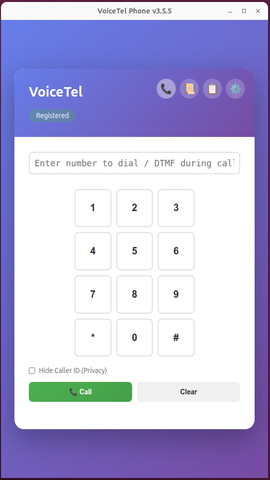
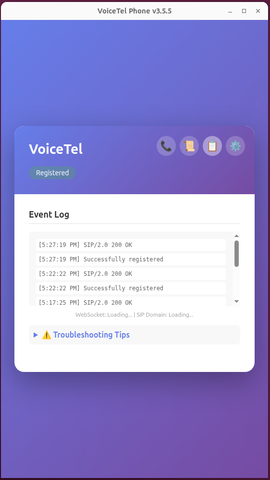
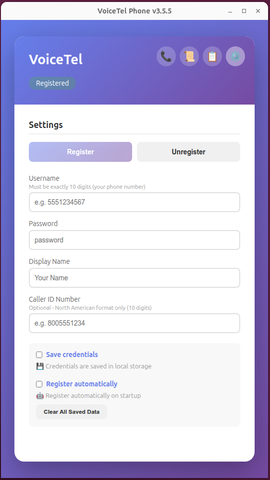
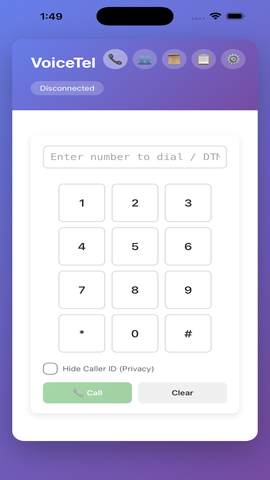
All SIP signaling and media negotiation occur directly between your device and your SIP server. No analytics or third‑party tracking are embedded. Credentials are stored locally on the device.
- Email: support@voicetel.com
- Issues: Report bugs via GitHub Issues
- Documentation: Knowledge Base
This project is licensed under the MIT License - see the LICENSE file for details.
We welcome contributions! Thanks to these awesome people:
- Michael Mavroudis - Lead Developer & Architect
Proudly supported by:
| Sponsor | Contribution |
|---|---|
| VoiceTel Communications | Primary development and testing infrastructure |
- Website: www.voicetel.com
- Web App: phone.voicetel.com
- Repositories:
- Status Page: Available via the web application
Version: 3.5.6